Weather Alerts: Radar Tracker
Weather alertsWeather
4.25.00 Reviews
- Version
- 1.1.15
- Installs
- 10.00K
- Age Rating
- Everyone
Screenshots
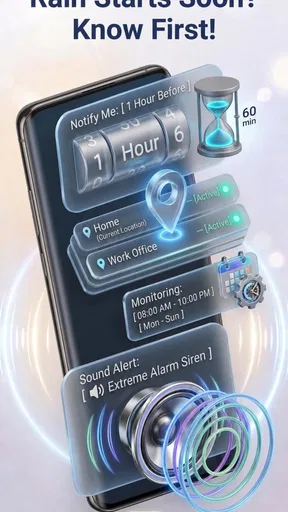
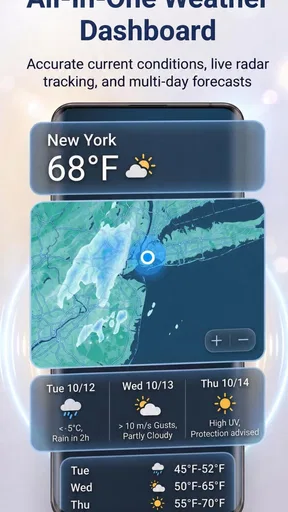
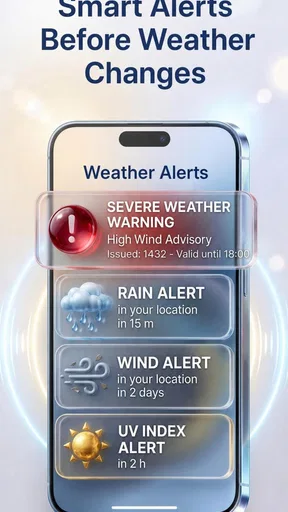
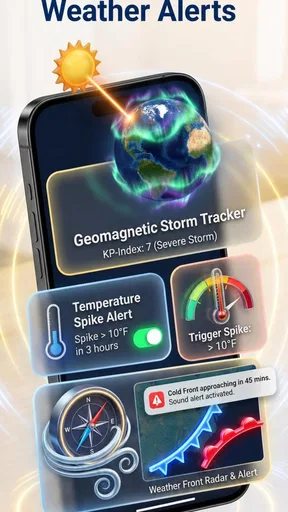
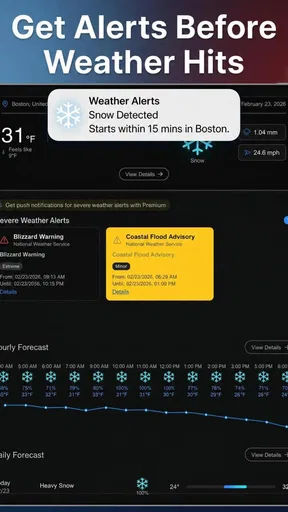
Our Review of Weather Alerts: Radar Tracker
 Analysis by Appyee
I approached Weather Alerts: Radar Tracker as a practical weather companion rather than another app I would open only to check the temperature. Its focus is more specific: severe-weather warnings, custom notifications, and a local radar view. That makes it potentially useful when the question is not “Will I need a jacket?” but “Do I need to change my plans because conditions may become dangerous?”
After using it, my impression is that its value depends heavily on how you prefer to receive information. Some people want a quick visual map and the ability to follow changing conditions. Others need a calm, highly predictable forecast screen with minimal interaction. This app leans toward the first group. It is free to start, rated for Everyone, and works on Android devices running version 7.0 or later. The developer shown for it is Weather alerts, and the current release is version 1.1.15.
How clearly the app communicates changing weather
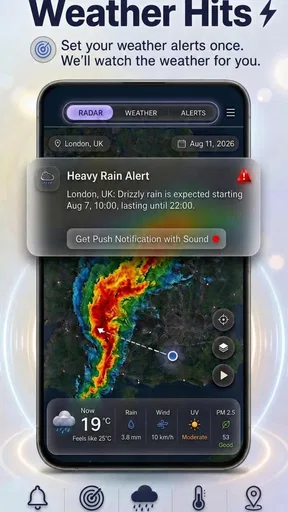
The strongest part of the experience is the combination of alerts and a local radar tracker. A standard weather widget may tell me that rain is expected, but a radar view gives me a better sense of movement and timing. That difference matters when I am deciding whether to leave now, delay a walk, protect outdoor items, or take a different route.
I found the radar concept especially useful for short-term decisions. Forecast icons are easy to understand, but they can feel too broad when a storm is approaching quickly. Watching nearby precipitation develop or move across the area gives the information more context. I would still treat the display as a planning aid rather than an instruction to take risks, but it is more actionable than a single daily forecast symbol.
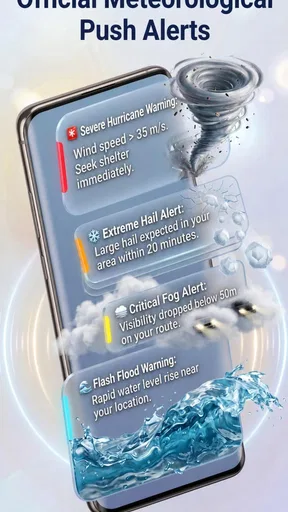
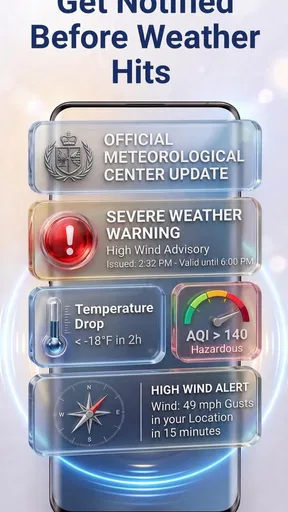
The app’s custom notification approach is another meaningful choice. Instead of relying only on a general forecast, I can think about which conditions deserve my attention. For someone who commutes early, cares for children, works outdoors, or needs to protect a vehicle and garden, a severe-weather notification can be more valuable than a long forecast page filled with details that are not immediately relevant.
There is an important trade-off here. More alerts do not automatically mean better awareness. If notifications are too frequent, I may start dismissing them without reading. I recommend beginning with the narrowest alert setup that matches my routine, then adjusting it after seeing how often the messages appear. A notification should prompt a decision, not become background noise.
Readability for quick checks
Weather information is usually consumed while I am distracted. I may be standing outside, preparing breakfast, walking toward a car, or trying to decide whether to leave work. In that setting, readable wording and a clear visual hierarchy matter more than decorative presentation. The radar tracker helps because it turns a changing situation into something I can inspect visually instead of interpreting several lines of text.
For users with reduced vision, a map can be helpful when colors and boundaries are easy to distinguish, but it can also create confusion if several layers compete for attention. I would not assume that a radar image alone is sufficient. Anyone who depends on text-to-speech, enlarged display settings, or strong contrast should spend time checking whether the important warning information remains understandable with their preferred phone settings.
I also prefer to read an alert before reacting to its urgency. A bright warning or prominent notification can attract attention, but the practical questions are more specific: what area is affected, how soon might conditions change, and what action is sensible? The app is most useful when I use the radar and warning information together rather than treating a visual signal as a complete explanation.
One useful habit is to open the app before a recurring activity instead of waiting for a notification at the last moment. For example, before cycling home, I can look at the local radar and then decide whether the route is still sensible. This workflow reduces pressure on people who need extra time to process visual information or who prefer making decisions in a quiet environment.
Navigation and the cost of extra information
A radar-centered weather tool naturally asks me to do more than glance at a number. I may need to move between an alert, a map, and a local view. That is worthwhile for people who want situational awareness, but it may feel like unnecessary friction for someone who only wants the current temperature and tomorrow’s forecast.
My advice is to decide what job the app has on the phone. If its job is “warn me when serious weather matters,” I would keep it available for notifications and use the radar when conditions look uncertain. If its job is “replace every part of my normal forecast routine,” I would compare it carefully with a conventional weather app first. A focused warning tool does not necessarily replace a full forecast service.
The free price makes trying that workflow easy, although the app includes optional purchases ranging from $6.99 to $112.99 per item. That is a very wide range, so I would examine each purchase screen carefully before confirming anything. I would not pay simply because a feature sounds more advanced; I would first use the basic experience long enough to identify a real limitation in my own routine.
Using it across different abilities and everyday situations
I look at accessibility here as a practical question: can I notice a change in the weather and make a decision without having to use the radar in exactly one way? A useful approach is to test the alert and map with the phone settings I rely on, then decide which part works best for my routine. That leads naturally to how the app fits different abilities and everyday situations.
Motor considerations and low-effort interaction
Weather checking is often a one-handed task. I may be holding an umbrella, carrying groceries, using a mobility aid, or standing on a crowded platform. An app that requires precise map gestures or repeated tapping can become difficult in those moments, even if the information itself is useful.
For that reason, I would set up the app when I am comfortable and not during the weather event itself. Customizing notification preferences in advance is a practical accessibility step: it reduces the number of interactions needed when I am outdoors or under time pressure. I would also avoid trying to explore the radar while walking. The map is better used while stationary, with enough attention to interpret it safely.
People with tremors, limited reach, or difficulty with small targets may find a detailed map less convenient than a simple alert. In that case, the app’s greatest benefit may come from its notifications rather than from continuous radar exploration. A family member or support person could also help establish a routine in which the user checks a clear warning before leaving home, without requiring them to manipulate the map every time.
There is a subtle distinction between reducing effort and removing control. Automatic alerts reduce effort, but they should not replace the user’s judgment. I would treat them as prompts to pause and check conditions, especially when a person has limited ability to change plans quickly. A warning received early can be useful; a warning ignored because it appears too often is not.
Sensory needs and notification design
Severe-weather notifications can support people who do not constantly watch the sky or listen for environmental changes. Someone with hearing loss, for example, may benefit from visual phone alerts rather than relying on thunder or spoken announcements outdoors. Someone who is sensitive to sudden interruptions may prefer a restrained setup that avoids unnecessary warnings.
The right balance will vary. I would keep the phone’s general notification behavior in mind, because the app is only one part of the experience. If the device is muted, in a focus mode, or placed out of reach, a warning may not be noticed immediately. Conversely, a person who is easily startled should not assume that every alert is harmless background information. Severe-weather messages deserve a clear personal routine for checking and responding.
Radar also introduces color dependence. Many weather maps use changing shades to represent intensity or movement, and this can be harder to interpret for people with color-vision differences. I would cross-check the visual pattern with the written warning and avoid relying on one color alone. If the map is difficult to interpret, the alert text may be the more dependable part of the app for that user.
For users who prefer larger text, a system-wide display setting may improve some screens, but enlarged content can also require more scrolling. That is not a reason to avoid the app; it is a reason to test the complete sequence before depending on it. I would check the warning, open the local radar, and return to the main view using the phone settings I actually use every day.
Situational access: commuting, travel, and home routines
A realistic example is a morning commute during an unsettled week. I might see no rain outside, yet the radar could show a band moving toward the route I normally take. Rather than waiting for the weather to become obvious, I can decide whether to leave earlier, carry protective clothing, or use another form of transport. The app does not make that decision for me, but it shortens the time between noticing a risk and considering a response.
It can also help when plans involve people with different needs. A parent may want an early warning before taking a child to a playground. A caregiver may need time to adjust an appointment for someone who cannot move quickly. An outdoor worker may want to check conditions before committing to a task. In each case, the useful feature is not simply knowing that weather exists; it is gaining enough notice to make a safer, less rushed choice.
At home, I would use the radar for tasks that are sensitive to timing. Closing windows, bringing in laundry, checking a roof or garden area, and deciding whether to walk a dog can all benefit from a short-term view. The app is less compelling when I am planning something several weeks away, because a radar tracker is most meaningful for nearby, changing conditions rather than distant certainty.
Travel introduces another limitation: local relevance depends on selecting or viewing the right area. I would check the location shown before trusting an alert, particularly after crossing a city boundary or arriving somewhere new. A warning for home is not automatically useful for a destination, and a map that remains centered on the wrong place can create false confidence.
For people with limited data access or unreliable connectivity, I would avoid treating the app as the only safety resource. A radar view is most useful when it can update, and severe weather can change faster than a person expects. Keeping a second way to receive urgent local information is sensible, especially when traveling, working remotely, or living in an area where phone service is inconsistent.
Where the experience still creates barriers
The biggest barrier is the difference between weather awareness and weather action. A map may show movement, but it does not automatically explain what that movement means for a particular street, building, or person. Users who need plain-language guidance may find a radar view demanding, especially if they are unfamiliar with precipitation patterns.
Another barrier is alert management. Custom notifications sound convenient, but customization itself requires decisions. Which warnings matter? How much notice is enough? Which alerts can be ignored safely? A user with cognitive fatigue may prefer fewer choices and a straightforward default. I would make changes gradually and write down a simple personal rule, such as checking the app before leaving when a warning appears, rather than repeatedly changing settings during a storm.
The app may also be a poor fit for people who want detailed long-range planning, extensive historical weather information, or a broad collection of lifestyle tools in one place. A traditional forecast app can be better for comparing several days, checking hourly temperatures, or organizing travel plans. A dedicated emergency information source may be more appropriate when the concern is evacuation, official instructions, or local public-safety notices.
Privacy and permissions are worth considering in practical terms, even without turning the decision into a technical exercise. Location-based weather is convenient, but I would review the phone’s permission controls and choose the least intrusive arrangement that still makes the app useful. If I do not want ongoing location access, I would check whether manually viewing the relevant area fits my routine. The important point is to understand how much convenience I am exchanging for automatic local awareness.
Finally, no alert app should be treated as a substitute for common sense, official emergency guidance, or direct observation of dangerous conditions. If authorities issue instructions, those instructions take priority. I see this app as an early-awareness layer: helpful for prompting a check, but not a replacement for decisions made with local information and appropriate caution.
Who will appreciate it most
I think the app is best for people who make frequent short-term decisions around changing weather. Commuters, outdoor workers, dog walkers, caregivers, parents, and anyone who wants a local radar view can get more from it than from a basic temperature widget. It is also a reasonable option for users who want to begin without paying and then decide whether optional features fit their needs.
It may be especially helpful for people who cannot easily monitor the sky, listen for weather changes, or react quickly once conditions worsen. Early visual and phone-based prompts can give them more time to prepare. That benefit depends on the alerts being noticeable and understandable on their device, so I would test the complete notification path rather than assuming it will work perfectly for every sensory need.
I would skip it if my priority is a quiet, minimal forecast with no interest in maps or severe-weather tracking. I would also look elsewhere if I need a comprehensive travel planner, official emergency instructions, or a highly specialized accessibility experience. The app has a clear purpose, and that is a strength, but it also means it should not be judged as though it were an all-in-one weather platform.
My inclusive verdict
Weather Alerts: Radar Tracker has a useful idea at its center: combine timely warnings with a visual way to follow nearby conditions. In my experience, that makes it more practical than a simple daily forecast when I need to decide whether to leave, wait, reroute, or prepare. Its accessible value comes less from any formal claim and more from giving different people multiple ways to notice changing weather: a notification, a written warning, and a radar view.
At the same time, the experience asks users to interpret a map, manage alert preferences, and verify that the displayed area is the one that matters. Those are manageable tasks for many people, but they can be real barriers for users with motor, sensory, cognitive, connectivity, or time-pressure challenges. I would set it up calmly, test it with my normal phone settings, and keep a backup source for serious situations.
With an average rating of 4.2 from around sixty ratings and over ten thousand installs, it has attracted a modest early audience since its release on February 10, 2026. Those figures suggest interest, but they do not remove the need to judge the workflow personally. My recommendation is straightforward: try the free version if local radar and severe-weather prompts match your routine, but do not purchase anything until the app proves that its alerts and navigation genuinely reduce effort for you.
My final view is that this is a focused weather tool, not a universal replacement for every forecast service. For quick local awareness and more deliberate preparation, I would recommend giving it a careful trial. For users who need the simplest possible forecast, highly detailed long-range planning, or official emergency direction in one place, a different option will probably serve them better.
Verdict
Strengths of Weather Alerts: Radar Tracker
- Live radar maps make approaching storms easy to monitor.
- Severe weather alerts can help users prepare before conditions worsen.
- Location support provides forecasts for current and saved places.
- Useful for tracking rain, snow, wind, and temperature changes.
- Clear weather data is helpful for planning commutes and outdoor activities.
Limitations of Weather Alerts: Radar Tracker
- Alert accuracy and timing can vary by location and data provider.
- Frequent notifications may become distracting during unsettled weather.
- Some advanced radar or forecast features may require a subscription.
- The app may use extra battery when location and radar updates stay active.
- Weather maps can load slowly with weak mobile data connections.
Similar Picks in This Category
View All
Weather - By Xiaomi
Xiaomi Inc.4.1

Weather & Radar Forecast
WetterOnline4.8

Weather
OneLouder Apps4.6

AccuWeather: Weather Radar
AccuWeather3.6

The Weather Channel - Radar
The Weather Channel4.6

1Weather Forecasts & Radar
OneLouder Apps4.3
Frequently Asked Questions
What is Weather Alerts: Radar Tracker used for?
Weather Alerts: Radar Tracker is designed to help you monitor current conditions, approaching rain, storms, temperature changes, and other weather developments. After opening the app, you can generally view radar-style weather information for a selected location and check forecasts before traveling or planning outdoor activities. Its main value is combining quick weather updates with visual tracking tools in one mobile application.
Does Weather Alerts: Radar Tracker provide real-time severe weather notifications?
The app is intended to notify users about important weather changes and potentially severe conditions, but the exact alerts available can depend on your location, device settings, internet connection, and the permissions you grant. Notifications may also rely on data supplied by external weather services. For dangerous situations such as hurricanes, tornadoes, or flooding, you should always compare the app’s information with official government alerts and local emergency instructions.
Does the app require location access to work properly?
Weather Alerts: Radar Tracker can usually provide more relevant forecasts and warnings when location access is enabled, because it can identify the area where you currently are. However, users who prefer not to share their location may be able to search for and save a city manually. Before downloading, review the permission requests and choose the access level you are comfortable with. Some features may be less convenient without location services.
Can I use Weather Alerts: Radar Tracker without an internet connection?
An internet connection is generally needed to load updated radar imagery, refresh forecasts, retrieve warnings, and display current weather information. The app may continue showing previously loaded data for a short time, but that information can quickly become outdated, especially during changing or dangerous conditions. For dependable results, use the application with mobile data or Wi-Fi available and avoid treating cached information as a current emergency update.
Is Weather Alerts: Radar Tracker free to download, and are there in-app purchases?
The application may be available as a free download, but some features can be supported by advertising, subscriptions, or optional in-app purchases. Depending on the version and platform, advanced radar layers, extended forecasts, an ad-free experience, or additional alert tools may require payment. Check the Google Play Store or Apple App Store listing for the current pricing, trial terms, renewal details, and cancellation policy before subscribing.
